
Exploring Memory Overcommit with OpenShift Virtualization on ROSA
This content is authored by Red Hat experts, but has not yet been tested on every supported configuration. This guide has been validated on OpenShift 4.22. Operator CRD names, API versions, and console paths may differ on other versions.
OpenShift Virtualization on Red Hat OpenShift Service on AWS (ROSA) supports predefined virtual machine instance types for different workload profiles. In this article, we compare General Purpose U series instance types with Overcommitted O series instance types and test how memory overcommit changes Kubernetes scheduling behavior.
CPU overcommit versus memory overcommit
Before starting the lab, it is useful to distinguish CPU overcommit from memory overcommit.
For the VM instance types used in this article, CPU is already shared. For example, both u1.4xlarge and o1.4xlarge expose 16 vCPUs to the guest, but the virt-launcher pod requests only 1600m CPU from Kubernetes. This means guest vCPUs are not pinned 1:1 to physical CPUs by default.
Memory overcommit is different. Memory is less forgiving than CPU because a node cannot safely time-slice physical memory the same way it time-slices CPU. The O series instance types explicitly configure memory overcommit by setting overcommitPercent. For example, o1.medium exposes 4 GiB of guest memory but requests approximately half of that memory from Kubernetes, plus virtualization overhead.
This lab focuses on memory overcommit. We test what changes from a Kubernetes scheduling perspective, what the guest operating system sees, and what happens when the guest consumes more memory than its request.
Environment
This lab used the following environment:
| Component | Value |
|---|---|
| Platform | ROSA with hosted control planes |
| OpenShift version | 4.22.2 |
| Region | us-west-2 |
| Default worker instance type | m5.2xlarge |
| Virtualization worker instance type | m5zn.metal |
| Virtualization worker count | 1 |
| VM storage class | gp3-csi |
| Test namespace | virt-overcommit-test |
| Guest OS | Fedora |
| OpenShift Virtualization version | 4.21.10 |
The m5zn.metal worker was used because OpenShift Virtualization requires bare-metal workers on ROSA. The regular m5.2xlarge workers were kept for the base cluster, while the virtual machines were scheduled only onto the m5zn.metal node.
What we tested
This lab tests three things:
- How
Useries andOseries instance types differ in their Kubernetes memory requests. - Whether multiple overcommitted VMs can schedule when total guest memory exceeds node allocatable memory.
- Whether a guest can consume more memory than its Kubernetes memory request.
The key finding is:
Overcommitted O series instance types reduce the Kubernetes memory request used for scheduling, but the guest still sees the full assigned memory. This allows higher VM density, but the node must still have enough real memory for actual guest consumption.
Prerequisites
You need:
- A ROSA HCP cluster.
- OpenShift Virtualization installed.
- A supported bare-metal worker machine pool.
- A default storage class.
oc,rosa,virtctl, andjqinstalled locally.- Cluster-admin access.
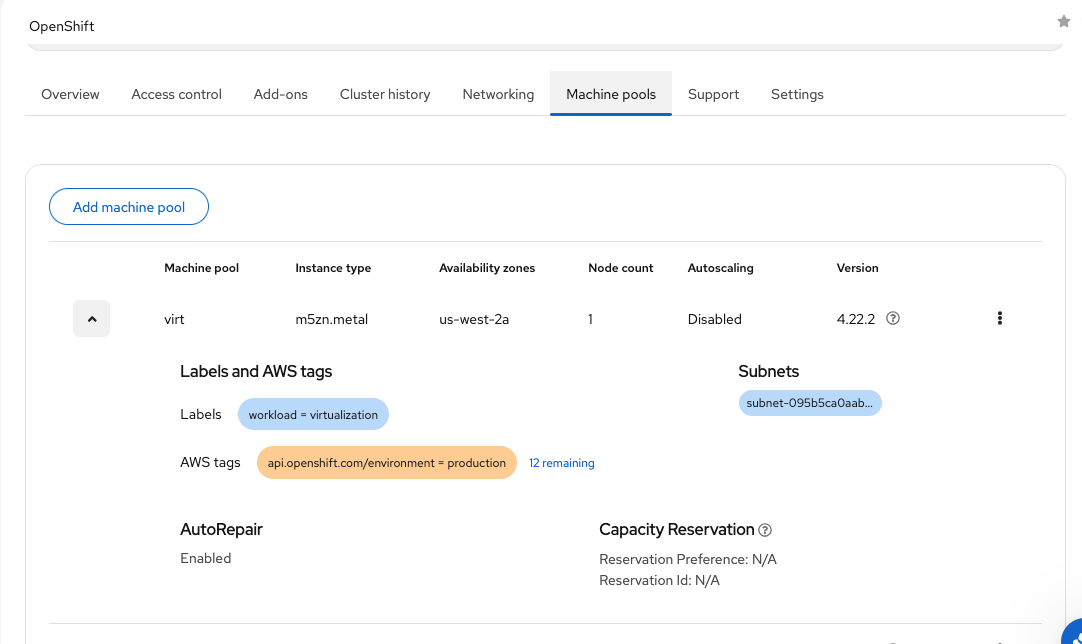
For this lab, a dedicated bare-metal machine pool was added:
The exact command might differ depending on whether the machine pool is created through Terraform, the ROSA CLI, or the OpenShift Cluster Manager console.
After the machine pool is created, verify the node:
Example output:
Label the bare-metal node so that test VMs can be scheduled explicitly onto it:
Check node allocatable capacity:
Example output:
This gives approximately 187.4 GiB of allocatable memory on the m5zn.metal node.
Verify OpenShift Virtualization
Confirm that the OpenShift Virtualization components are deployed:
Example output:
Verify the node is schedulable for virtualization:
Verify KVM resources on the bare-metal node:
Example output:
Verify boot sources
Check that the Fedora boot source is available:
Example output:
Confirm that the DataVolumes are imported successfully:
Example output:
Create the test project
Compare General Purpose and Overcommitted instance types
OpenShift Virtualization provides predefined VirtualMachineClusterInstancetype resources.
List the General Purpose instance types:
Example output:
List the Overcommitted instance types:
Example output:
Inspect u1.medium and o1.medium:
The General Purpose u1.medium instance type defines:
The Overcommitted o1.medium instance type defines:
The O series is based on the U series, but with memory overcommit enabled.
Create baseline VMs
Create two Fedora VMs from the OpenShift console:
| VM name | Instance type | Guest CPU | Guest memory |
|---|---|---|---|
fedora-baseline |
u1.medium |
1 | 4 GiB |
fedora-overcommitted |
o1.medium |
1 | 4 GiB |
For both VMs, add the following node selector:
Verify placement:
Example output:
Compare VM pod requests
Check the resource requests for the compute container in each virt-launcher pod:
Example output:
Both VMs expose 4 GiB of guest memory, but the Overcommitted VM requests significantly less memory from Kubernetes.
| VM | Guest memory | Pod memory request |
|---|---|---|
fedora-baseline |
4 GiB | 4364 Mi |
fedora-overcommitted |
4 GiB | 2320 Mi |
The memory request is lower because the o1.medium instance type uses overcommitPercent: 50.
Validate guest-visible resources
Connect to the VM:
Inside the VM:
For the larger o1.4xlarge VMs created later in this lab, the guest saw:
This confirms that the guest sees the full assigned resources. The reduced memory request affects Kubernetes scheduling, not the memory visible inside the guest.
Test scheduling with General Purpose VMs
Create three Fedora VMs with the u1.4xlarge instance type:
| VM name | Instance type | Guest CPU | Guest memory |
|---|---|---|---|
fedora-u64-1 |
u1.4xlarge |
16 | 64 GiB |
fedora-u64-2 |
u1.4xlarge |
16 | 64 GiB |
fedora-u64-3 |
u1.4xlarge |
16 | 64 GiB |
Add the node selector to each VM:
Check the pods:
Example output:
Describe the pending pod:
Example scheduler event:
Check the memory request for each VM:
Example output:
Each u1.4xlarge VM requested approximately 64 GiB plus virtualization overhead. The third VM could not schedule because the node did not have enough unallocated requested memory.
Delete the U series test VMs before continuing:
Test scheduling with Overcommitted VMs
Create three Fedora VMs with the o1.4xlarge instance type:
| VM name | Instance type | Guest CPU | Guest memory |
|---|---|---|---|
fedora-o64-1 |
o1.4xlarge |
16 | 64 GiB |
fedora-o64-2 |
o1.4xlarge |
16 | 64 GiB |
fedora-o64-3 |
o1.4xlarge |
16 | 64 GiB |
Add the same node selector:
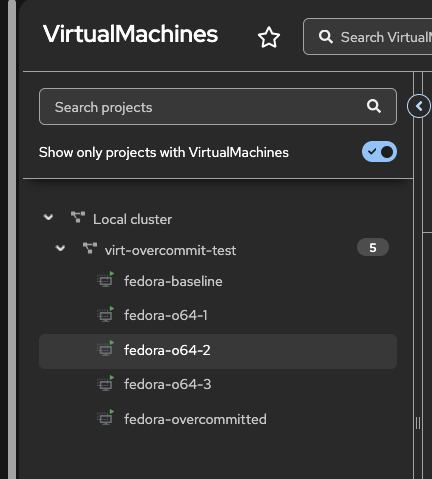
Verify that all three VMs schedule:
Example output:
Check their resource requests:
Example output:
The memory request is shown in bytes. Convert it:
Each o1.4xlarge VM exposes 64 GiB to the guest but requests only about 32.4 GiB from Kubernetes.
| Instance type | Guest memory | Pod memory request | Result |
|---|---|---|---|
u1.4xlarge |
64 GiB | 65924 Mi | Third VM could not schedule |
o1.4xlarge |
64 GiB | ~32.4 GiB | All three scheduled |
With three o1.4xlarge VMs, the total guest memory was:
This exceeded the node’s approximately 187.4 GiB of allocatable memory. The VMs still scheduled because their combined Kubernetes memory requests were much lower than their guest memory allocations.
Runtime memory consumption test
Scheduling is only one part of the story. The next step is to validate runtime behavior.
Connect to fedora-o64-1:
Install stress-ng:
Run a 24 GiB memory stress test:
Monitor from another terminal:
During the 24 GiB test, the fedora-o64-1 launcher pod increased to about 27 GiB of actual memory usage:
Next, run a 40 GiB memory stress test:
During the 40 GiB test, the pod reached approximately:
Check node memory pressure:
Example output:
This proves that the VM can consume more memory at runtime than its Kubernetes memory request, because the pod has no memory limit.
Two-VM runtime memory test
Install stress-ng on fedora-o64-2 as well:
Run the following command in both fedora-o64-1 and fedora-o64-2 at roughly the same time:
Monitor from another terminal:
Example output during the test:
Memory pressure remained false:
This shows that two overcommitted VMs, each requesting about 32.4 GiB, were able to consume about 43.6 GiB each at runtime without triggering node memory pressure in this environment.
Results
| Test | Result |
|---|---|
u1.medium vs o1.medium |
Both expose 4 GiB guest memory, but o1.medium requests about half the memory |
3 × u1.4xlarge |
Third VM could not schedule due to insufficient memory |
3 × o1.4xlarge |
All three VMs scheduled successfully |
Single o1.4xlarge with 40 GiB stress |
VM consumed about 43.7 GiB despite requesting about 32.4 GiB |
Two o1.4xlarge VMs with 40 GiB stress each |
Both VMs consumed about 43.6 GiB; node memory pressure stayed false |
Important observations
The O series does not reduce the memory visible to the guest. It reduces the Kubernetes memory request used for scheduling.
For example:
This allows more VMs to schedule on the same node, but it does not create more physical memory. If all overcommitted VMs consume their full guest memory at the same time, the node can still experience memory pressure or VM disruption.
CPU behavior is different. In these tests, both U series and O series VMs used shared CPU. For example, both u1.4xlarge and o1.4xlarge exposed 16 guest vCPUs and requested 1600m CPU from Kubernetes.
Live migration note
The VMs in this lab used gp3-csi RWO volumes. As a result, the VMIs reported warnings similar to:
This warning was expected for this lab and did not affect the memory overcommit validation. Testing live migration would require shared storage such as RWX-capable storage.
Cleanup
Delete the test VMs:
Verify that resources are removed:
Delete any remaining DataVolumes or PVCs:
Delete the test project:
Delete the bare-metal machine pool:
Example:
Verify that the bare-metal node is removed:
During deletion, the node might briefly appear as Ready,SchedulingDisabled. Wait until it disappears from the node list.
Conclusion
OpenShift Virtualization on ROSA supports predefined overcommitted VM instance types through the O series. These instance types reduce the Kubernetes memory request used for scheduling while keeping the full guest memory visible inside the VM.
In this lab, three o1.4xlarge VMs exposed a combined 192 GiB of guest memory on a node with about 187.4 GiB of allocatable memory. They scheduled successfully because each VM requested only about 32.4 GiB from Kubernetes. Runtime stress testing showed that the guests could consume more memory than their requests, and the node remained healthy while actual memory usage stayed within physical capacity.
Memory overcommit is useful for increasing VM density, but it should be used carefully. It works best when VM memory peaks are understood and not all guests are expected to consume their full assigned memory at the same time.
