
Deploying BGP Cloud Connector on ROSA HCP
This content is authored by Red Hat experts, but has not yet been tested on every supported configuration. This guide has been validated on OpenShift 4.22. Operator CRD names, API versions, and console paths may differ on other versions.
The official Red Hat BGP Cloud Connector Operator provides direct Layer 3 connectivity between Cluster User Defined Networks (CUDNs) and the Amazon Virtual Private Cloud (VPC) that hosts a Red Hat OpenShift Service on AWS (ROSA) cluster. It uses AWS VPC Route Server to advertise CUDN routes into VPC route tables.
This guide configures BGP Cloud Connector on an existing ROSA cluster with hosted control planes (HCP), creates a primary Layer 2 CUDN, and confirms that an existing EC2 instance can reach an OpenShift Virtualization VM at its CUDN address without inbound NAT, a load balancer, or a NodePort Service.
Architecture
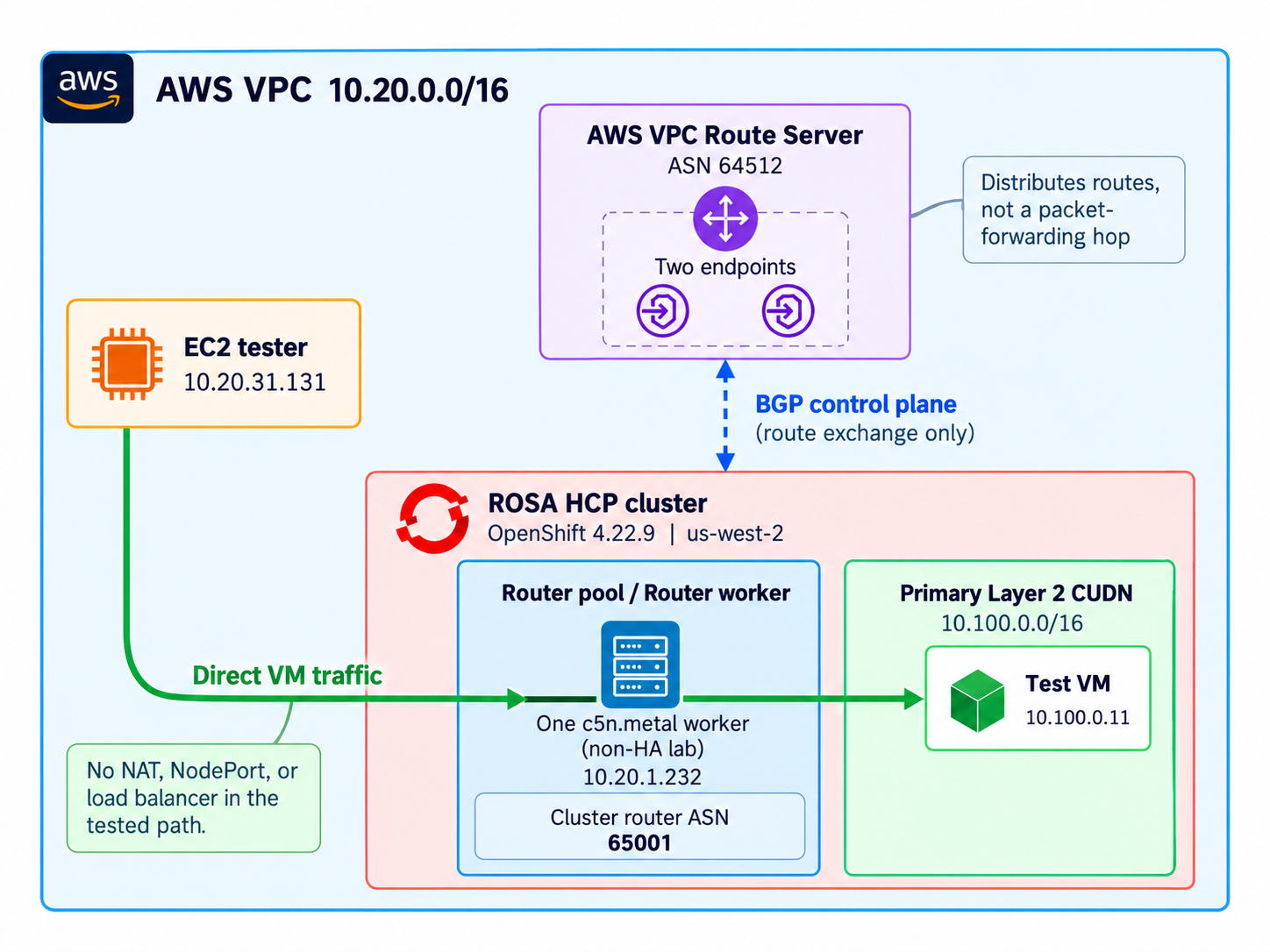
The traffic path has four steps, in two phases — route distribution (1–2) and the data path (3–4):
- FRR on selected ROSA compute nodes establishes BGP sessions with two AWS Route Server endpoints.
- BGP Cloud Connector advertises the CUDN prefix. Route Server propagates the learned route into selected VPC route tables.
- An EC2 instance sends traffic for the VM address to a selected compute-node ENI.
- OVN-Kubernetes forwards the packet from that node to the VM on the primary CUDN.
Note that the AWS Route Server distributes routes. It is not in the application data path.
The lab used one c5n.metal router worker, two Route Server endpoints, CUDN 10.100.0.0/16, VM 10.100.0.11, and EC2 tester 10.20.31.131. This single-worker topology was sufficient for a functional test, but it is not highly available. A production design should use eligible workers and Route Server endpoints across the required subnets and Availability Zones.
The recorded lab environment ran OpenShift 4.22.9, OpenShift Virtualization 4.22.12, and BGP Cloud Connector Operator 1.0.0.
Prerequisites
You need:
- An existing ROSA HCP cluster and
cluster-adminaccess. - OpenShift Virtualization installed and a suitable storage class. See Deploying OpenShift Virtualization on ROSA .
- AWS and ROSA CLI credentials with permission to manage IAM, EC2 security groups, ROSA machine pools, VPC Route Server resources, and route propagation.
- A CUDN CIDR that does not overlap the VPC, cluster, peered VPC, Transit Gateway, VPN, Direct Connect, or on-premises networks.
- An existing EC2 tester in the cluster VPC. Its subnet route table must receive Route Server propagation, and its security group must allow the test protocol from the CUDN CIDR.
- Current
aws,rosa,oc,jq, andvirtctlclients.
Costs and ownership
Route Server endpoints, bare-metal workers, EC2 instances, and VM storage incur charges. Route Server endpoints are billed per endpoint per hour whether or not traffic flows, and this procedure creates two; check current pricing before you start. Bare-metal instance types are also materially more expensive than standard workers. Record the owner and provisioning method for each resource before creating it. Do not delete shared resources during cleanup.
Set the values used repeatedly:
1. Prepare AWS and the router workers
Create the Operator IAM role
Get the cluster OIDC issuer and AWS account ID:
Create operator-permission-policy.json:
Create operator-trust-policy.json. Replace both placeholders with the values collected above:
The subject restricts the role to the Operator service account. The openshift audience is used by the Manual/STS token projected through the Cloud Credential Operator flow configured later with ROLEARN. The sts.amazonaws.com audience is used by the alternative pod-injected IRSA flow. The upstream authentication guidance includes both audiences so the same role can support either documented credential path. This guide uses the Manual/STS ROLEARN flow.
The permission policy above retains "Resource": "*" because it is the simplified policy used for this lab. Read-only Describe actions and sts:GetCallerIdentity require that scope. For a hardened deployment, scope the mutating Route Server peer, tagging, and ENI actions as described in the upstream
AWS authentication least-privilege guidance
. Verify current EC2 action and condition-key support before applying a restricted policy.
Create the policy and role:
Create the BGP security group and machine pool
Create a dedicated security group in the cluster VPC:
Configure these rules according to your network policy:
- TCP 179 ingress and egress between router workers and Route Server endpoint subnets.
- TCP and UDP 32768 through 60999 ingress for return traffic that can enter through a different compute node.
- Workload protocols required for the test, such as ICMP and TCP 8080 from the VPC CIDR.
- UDP 3784 if you use BFD rather than BGP keepalives.
Scoped to the VPC CIDR, that is:
Tighten these before production use; the VPC CIDR is broader than the Route Server endpoint and router-worker subnets actually require. Egress is covered by the default allow-all egress rule, so TCP 179 egress needs no explicit entry.
Security groups do not override network ACLs. Confirm that the worker and endpoint subnet ACLs allow TCP 179 in both directions. BGP rules alone are not sufficient for the connectivity test. The worker and EC2 tester subnet ACLs must also allow the application traffic, such as ICMP and TCP 8080, plus the corresponding response traffic. Network ACLs are stateless, so define both ingress and egress rules, including the applicable ephemeral TCP ports for replies. Check every subnet that can carry the request or return path, especially when traffic can enter through one router worker and leave through another. The dedicated security group supplements the ROSA-managed groups; it does not replace them.
Create a machine pool with the security group and router label. The lab used one worker. Use a topology appropriate for your availability requirements.
Use --subnet, not --availability-zone. The router worker must land in the same
subnet that holds the Route Server endpoints created in step 2. An availability zone can
contain several subnets, so the AZ flag does not guarantee correct placement. The two flags
are mutually exclusive; supplying both fails with setting both subnet and availability-zone flag is not supported.
Attach the security group when creating the machine pool. Adding one to an existing ROSA HCP machine pool can require replacement.
2. Create AWS VPC Route Server resources
Create a Route Server with an ASN that differs from the cluster ASN used later:
Wait until the VPC association is associated. Create two endpoints in every subnet that contains a BGP-enabled worker:
describe-route-server-endpoints does not accept a route-server-id filter. Passing
--filters Name=route-server-id,... returns InvalidParameterValue. Filter client-side
with --query, as above, or pass explicit --route-server-endpoint-ids.
Wait until both endpoints are available. Note the EniAddress of each; these are the
BGP peer addresses the router worker will connect to.
Enable propagation on the route tables used by the router-worker subnets and EC2 tester subnet:
Repeat the enable command for each required route table. Do not continue until each propagation is available.
3. Install the official Operator
Enable the FRR routing provider:
Create bgp-cloud-connector-operator.yaml. Replace <operator-role-arn> with BGP_ROLE_ARN:
Wait for the ClusterServiceVersion to report Succeeded. This guide uses only the official Red Hat Operator distributed through the redhat-operators catalog. Its source is available in the
openshift/bgp-cloud-connector repository
.
4. Configure BGP and the primary CUDN
Save the following cluster-scoped singleton as bgpcloudconfiguration.yaml. The local ASN must differ from the Route Server ASN:
Every node that can run a directly routed workload must match routerNodeSelector. VM traffic exits through the ENI of the node that hosts the VM. The Operator also disables source and destination checks on selected nodes’ primary ENIs.
Save the workload namespace as namespace.yaml with both labels present at creation time:
ROSA admission policy can prevent adding the primary-UDN label later.
Save BGPRouting as bgprouting.yaml with a non-overlapping prefix:
BGPRouting owns the generated Layer 2 CUDN and route advertisements. Do not create or edit that generated CUDN separately. Wait for both BGP custom resources to report Ready.
5. Test connectivity with a VM
If you already have an OpenShift Virtualization VM connected to the primary CUDN advertised by BGP Cloud Connector, you can use it for the connectivity tests below. Confirm that the VM runs on a node selected by BGPCloudConfiguration.spec.routerNodeSelector and uses a compatible network binding that exposes its CUDN address directly.
Otherwise, follow the example below to deploy a disposable VM for testing.
The example preserves the native KubeVirt bridge binding used in the original inbound BGP connectivity test. The official ROSA BGP routing guide also shows bridge: {}. The upstream BGP Cloud Connector
kubevirt-testing.md
example instead shows the l2bridge binding, although its binding table also reports that bridge supports inbound and outbound traffic. Separate RHEL tests in this lab used l2bridge for persistent identity and live migration. Those tests did not establish that bridge is live-migratable, and the original inbound test did not use l2bridge.
The lab used quay.io/containerdisks/fedora:latest, but the resolved digest was not recorded. Resolve and pin an image digest for a repeatable deployment, then test that image with your OpenShift release. The manifest assumes the guest image includes cloud-init, systemd, and Python 3 so it can create the HTTP endpoint. If the selected image lacks one of these components, use a compatible image or adjust the service.
Replace <storage-class> with an available storage class and save the following manifest as vm.yaml:
Reading ipAddress immediately after oc wait --for=condition=Ready returns an empty
string: Ready indicates the VM is running, not that the guest agent has reported its
addresses. The address should fall inside the CUDN prefix, for example 10.100.0.4.
6. Confirm BGP and direct connectivity
Confirm the generated resources and BGP sessions:
Every expected endpoint peer must report Established. One router worker and two endpoints produced two sessions in the lab.
Confirm that the CUDN prefix appears as an active advertised route in the EC2 tester’s route table:
The route should have State set to active and Origin set to Advertisement.
The VM_IP shell variable above exists only on the workstation. Copy its printed value into a normal shell on the EC2 tester, then run the tests there:
The lab observed five ICMP replies and HTTP 200 between EC2 10.20.31.131 and VM 10.100.0.11. No inbound NAT, load balancer, or NodePort was used. A short capture on the tester showed the unchanged EC2 and CUDN addresses:
This proves the EC2-to-VM path. The original lab also observed VM-to-EC2 HTTP with the VM’s CUDN source address. Outbound internet routing is a separate design and is not covered here.
Troubleshooting
BGP sessions do not establish
Check the Route Server endpoints, TCP 179 security-group and network-ACL rules, differing ASNs, the bgp_router=true node label, FRR pods, and the Operator STS role.
BGP is established but the route is missing
Confirm that BGPRouting is Ready, its generated CUDN and RouteAdvertisements exist, and propagation is available on the tester’s route table. Check for overlapping or more-specific routes.
The route exists but traffic fails
Check worker and tester security groups, network ACLs, the guest firewall, the HTTP listener, and source/destination checks on selected worker ENIs. Confirm that the VM runs on a selected node and uses bridge: {} on the primary CUDN.
If ICMP succeeds but HTTP fails, troubleshoot the guest HTTP service separately. BGP routing does not start the service or open the guest firewall.
Optional guest service checks
Guest SSH is not required to prove BGP connectivity. During the lab, some virtctl ssh attempts ended with WebSocket error 1006 even when other network evidence was healthy. A failed virtctl ssh session does not, by itself, prove that BGP connectivity is broken.
If authorized guest access is already configured and virtctl ssh works, these checks can distinguish a guest service problem from a routing problem:
If guest access is unavailable, use an existing authorized console or guest-agent workflow. Do not change guest SSH, SELinux, or firewall settings solely to complete this BGP test.
Cleanup
If you deployed temporary resources for this walkthrough, remove them through the same provisioning method used to create them.
The cleanup sequence below is provided as general guidance. Before removing resources, verify their ownership, dependencies, and storage reclaim policies.
Do not delete shared ROSA, VPC, IAM, or storage resources solely because they were used in this example.
-
Delete the disposable VM and confirm its storage follows the intended reclaim policy.
-
Delete
BGPRoutingand wait for its CUDN, route advertisements, and advertised route to disappear. -
Delete
BGPCloudConfigurationand wait for Operator-created Route Server peers to be removed. -
Remove the Operator only if no other configuration uses it.
-
Disable propagation, delete endpoints, disassociate the VPC, and delete the Route Server through the workflow that created them.
-
Delete the dedicated machine pool only after confirming that it contains no shared workloads:
-
Wait for the machine-pool EC2 instances and their ENIs to disappear. Do not delete the security group while an instance or ENI still uses it:
-
After both checks return no resources, delete the dedicated security group:
Remove the IAM role only if no other workload uses it. Do not remove a shared machine pool, security group, or role.
