
Deploying BGP Cloud Connector on OpenShift Dedicated on Google Cloud
This content is authored by Red Hat experts, but has not yet been tested on every supported configuration. This guide has been validated on OpenShift 4.22. Operator CRD names, API versions, and console paths may differ on other versions.
The BGP Cloud Connector Operator advertises a cluster user defined network (CUDN) into the cloud routing fabric, so workloads on that network are reachable by their own addresses from outside the cluster, with no load balancer or NAT. This guide deploys it on OpenShift Dedicated (OSD) on Google Cloud with Workload Identity Federation (WIF), and tests it with a virtual machine on a bare metal router node.
Architecture
Router nodes run FRR and peer over BGP with a Cloud Router in the same VPC. The cluster advertises the CUDN prefix, the Cloud Router installs it, and anything in the VPC can reach pods and virtual machines on that prefix directly.
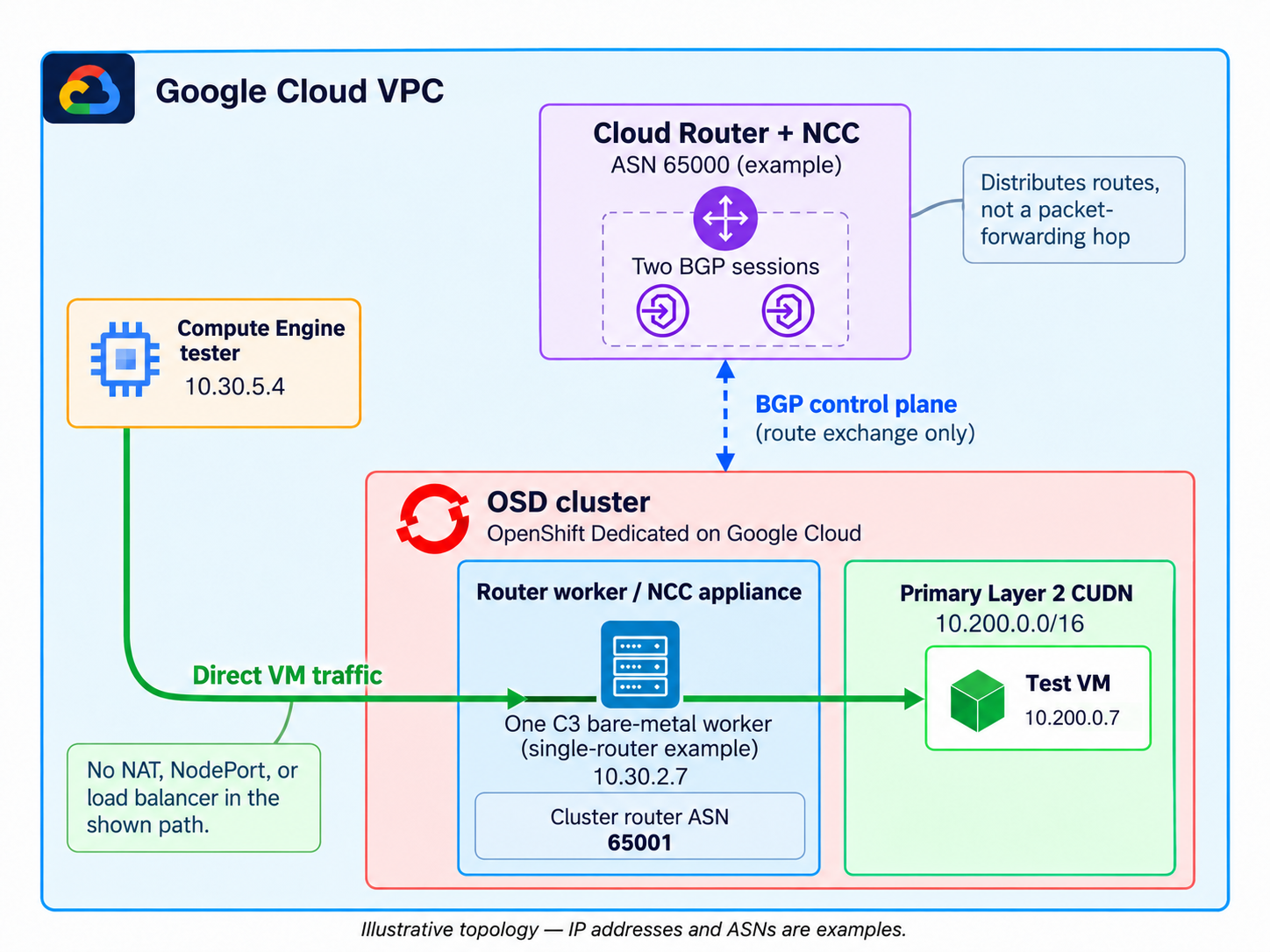
Two Google Cloud specifics shape the steps below:
- A VM can only peer with a Cloud Router once it belongs to a router appliance spoke on a Network Connectivity Center (NCC) hub. You create the hub; the Operator manages the spokes.
- The Operator authenticates with Application Default Credentials only, so on a WIF cluster you wire up its identity yourself (section 4).
Prerequisites
- An OSD 4.22 cluster on Google Cloud using WIF, in a single zone that offers C3 bare metal, with quota for one bare metal node
oclogged in to the cluster as a member ofcluster-admins- Permission in the cluster’s Google Cloud project to create VM instances, Cloud Routers, NCC hubs, service accounts, firewall rules, and IAM bindings
gcloud,ocm,oc,jq, andpython3installed, withgcloud,ocm, andocauthenticatedroles/compute.osAdminLogin(forsudo) androles/iap.tunnelResourceAccessor, to reach the client VM over IAP with OS Login
Note: A zone that offers C3 bare metal can still be out of capacity. Bare metal stock is limited, so for anything beyond a lab, consider a Compute Engine reservation for the router node.
Set the cluster name:
Read the remaining values from the cluster:
Confirm the cluster’s zone offers the bare metal type, and that you have quota for one router node (192 vCPU):
Note: This confirms the zone offers the type, not that capacity is available right now.
Set the BGP values. LOCAL_ASN (cluster) and CLOUD_ROUTER_ASN must differ. CUDN_CIDR must not overlap the cluster’s machine, pod, or service networks:
The Cloud Router needs two unused addresses in the worker subnet for its interfaces. Google Cloud reserves the last two addresses in a subnet and nodes are assigned addresses from the bottom of the range, so take two addresses near the top of the range and confirm nothing uses them:
Define a helper for the waits in this guide. It retries a command until it succeeds, and returns a failure status with a message if the time limit is reached:
1. Create the BGP Cloud Router and NCC hub
Create a dedicated Cloud Router with two redundant interfaces in the worker subnet. The cluster’s existing NAT router has no interfaces, so it cannot be used for BGP. The interface addresses become the BGP neighbors of every router node:
Expect the ASN, if-0;if-1, and your two interface addresses. Without interfaces the Operator discovers no neighbors.
2. Add the bare metal router node
The router node runs FRR and hosts the test VM, so it must be bare metal. The bgp_router=true label is what the Operator selects in section 5:
Note: Provisioning a bare metal node takes 10 to 15 minutes.
This example uses one router node, which is enough to demonstrate BGP and direct connectivity. Live migration needs at least two bare metal router nodes, so use --replicas 2 or more if you need it.
3. Install the Operator
Enable the FRR routing provider and install the Operator from redhat-operators:
The validated run used channel stable (the catalog default), CSV bgp-cloud-connector.v1.1.0, on OSD 4.22.20. Check the channels your catalog offers with oc get packagemanifest bgp-cloud-connector -n openshift-marketplace.
4. Grant the Operator access to Google Cloud
The Operator needs a Google Cloud service account, a workload identity binding to its Kubernetes ServiceAccount, and an external_account credentials file backed by a projected token.
Create the service account and grant it permissions. The service account ID is limited to 30 characters, so shorten SA_NAME if your cluster name is longer than 24 characters. IAM can take a short time to recognise a new service account, so each binding is retried for up to two minutes:
Lab permissions
These predefined roles are project-wide and broad. For production, use a custom role with only what the Operator needs: compute.routers.get and compute.routers.update (discover neighbors, manage peers), compute.instances.get, list, update, and use (find router nodes, set canIpForward, link them to spokes), networkconnectivity.spokes.* on the hub, and possibly compute.networks.use. Verify the set against your Operator version.
Read the Google pool and provider IDs from the WIF configuration, and bind the Operator’s ServiceAccount to the service account:
Create the credentials secret:
Once the secret exists, inject it into the Operator through its Subscription. The projected token audience must be openshift. OLM applies the Subscription config to the deployment shortly after the patch, so the block waits for the credentials volume before checking the rollout:
5. Configure BGP and the CUDN
Create the BGPCloudConfiguration singleton. Peer addresses are discovered from the Cloud Router:
All six conditions should be True, oc get nodes -l bgp_router=true should list your router node, and the peer group should list $RS_IF_0 and $RS_IF_1. The Operator may restart router nodes during its first reconciliation, so wait for them to be Ready again, then for the BGP sessions:
Each router node peers with both Cloud Router interfaces, so one router node gives two Established sessions. Adjust the count in sessions_up if you run more router nodes.
Create the workload namespace and the BGPRouting resource, which generates the CUDN and its route advertisement. Both namespace labels must be set at creation:
6. Test connectivity with a virtual machine
Install OpenShift Virtualization, if it is not already installed:
The router node should report a non-zero KVM count.
Create a test VM pinned to the router node, because only a BGP speaker can deliver traffic for the CUDN. It uses a containerDisk, which the kubelet pulls over the node network; a DataVolume import in this namespace would fail, because the CUDN has no internet egress. Cloud-init starts a small HTTP server:
The validated run used the bridge: {} binding shown. If you use a different binding, such as l2bridge, re-run the tests below.
Wait for the guest agent to report the VM’s CUDN address:
Confirm the guest service answers from inside the cluster. A pod in the same namespace shares the CUDN:
Expect BGP Cloud Connector VM endpoint. If this fails, fix the guest before testing the BGP path.
Create a client VM in the VPC, allow IAP SSH to it, and allow it to reach the test VM. Traffic for the CUDN prefix is delivered to the router node, so the rule targets the cluster’s worker tag:
The client VM and the IAP rule take a minute or two to become reachable, so the install retries until SSH succeeds.
These rules are added to the cluster’s VPC and removed in Cleanup. In a shared VPC, scope rules to the exact sources, targets, and ports you need. Traffic initiated from the CUDN carries a source address in $CUDN_CIDR, so rules for that direction must list it explicitly.
Reach the VM by its CUDN address from the client. The test stops at the first failed check:
Output from the validated run:
The client reached the VM on the address the guest itself holds, through a route the cluster advertised over BGP. The first hop is the router node, which advertised the prefix. Its address is in your worker subnet, so it will differ from the sample.
Troubleshooting
Start with the Operator log and the per-node state in Google Cloud:
| Symptom | Likely cause |
|---|---|
Router node never appears; router_ready times out |
Google Cloud has no capacity for $ROUTER_TYPE in $ZONE. Check the machine’s error with oc get machines -n openshift-machine-api -o jsonpath='{range .items[*]}{.metadata.name}{" "}{.status.providerStatus.conditions[?(@.type=="MachineCreated")].message}{"\n"}{end}'. ZONE_RESOURCE_POOL_EXHAUSTED means a stockout. Try another C3 bare metal type. A single zone cluster cannot add machine pools in another zone, so a different zone needs a new cluster. |
All BGPCloudConfiguration conditions are True, but there are no sessions and no spokes |
No router node. oc get nodes -l bgp_router=true returns nothing; see the row above. |
CloudEndpointsDiscovered is False |
Credentials. Check the secret is mounted, GOOGLE_APPLICATION_CREDENTIALS is set, the token audience is openshift, and the workloadIdentityUser binding names the exact ServiceAccount and pool. |
status.peerGroups is empty |
The Cloud Router has no interfaces, or cloudRouterName points at the NAT router. |
Sessions stay in Connect |
The node is missing from the spoke, the spoke is not ACTIVE, or localASN equals the Cloud Router ASN. |
| Some router nodes have no sessions | Every selected node must be RUNNING, in the spoke, have Cloud Router peers, and show canIpForward True. If one selected node cannot be configured, reconciliation for the others can stall while conditions still report True. |
| Sessions up, no route learned | BGPRouting is not RouteAdvertisementsCreated, or the route advertisement is not Accepted. |
| Route learned, traffic fails | Firewall rules, or the workload is not on a router node. |
Cleanup
Delete the workloads and the BGP configuration. The Operator’s finalizer then removes the NCC spokes and Cloud Router peers it created:
Wait until the cleanup is confirmed. Each check only passes on a successful query that finds nothing, so an API or permission error keeps it waiting:
Do not remove the router machine pool until this succeeds, because router nodes linked to a spoke cannot be deleted.
Remove the router machine pool and the Google Cloud resources this guide created. The cluster, its network, and its WIF configuration are left in place:
The Operator and OpenShift Virtualization remain installed. Uninstall them from the console if you no longer need them.
