
Deploying BGP Cloud Connector on ARO Standard
This content is authored by Red Hat experts, but has not yet been tested on every supported configuration. This guide has been validated on OpenShift 4.22. Operator CRD names, API versions, and console paths may differ on other versions.
Overview
BGP Cloud Connector provides direct Layer 3 connectivity between ClusterUserDefinedNetworks (CUDNs) on Azure Red Hat OpenShift (ARO) and routed Azure networks. It uses Azure Route Server to advertise CUDN prefixes and programs selected compute nodes to forward traffic.
This guide configures an existing ARO Standard cluster running OpenShift Container Platform 4.22 or later with service principal authentication, installs BGP Cloud Connector 1.1.0 through Operator Lifecycle Manager (OLM), configures two BGP router nodes, and tests bidirectional connectivity with an OpenShift Virtualization VM.
ARO clusters that use managed identities and ARO HCP have different identity and infrastructure models and are not covered.
Architecture
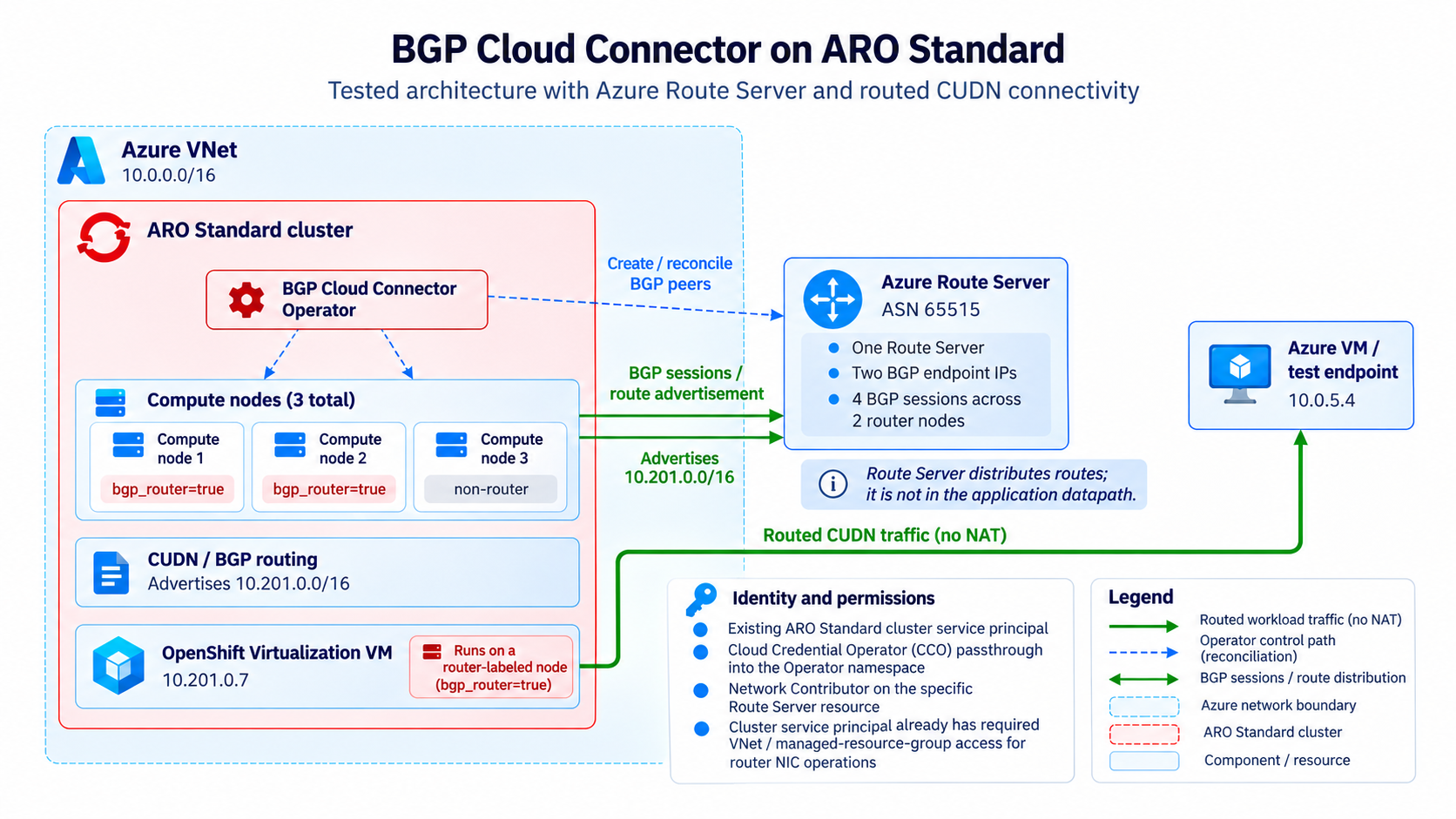
- FRR on each router node establishes sessions with the two redundant BGP endpoint IPs provided by one Azure Route Server.
- BGP Cloud Connector advertises the CUDN prefix, which Route Server propagates to the virtual network.
- Azure sends CUDN traffic to a router node network interface.
- OVN-Kubernetes forwards the traffic between that node and the workload.
Azure Route Server distributes routes. It is not in the application data path. Two router nodes connected to both Route Server endpoint IPs produce four BGP sessions.
This guide was tested in West US 2 with ARO Standard 4.22.22, three Standard_D8s_v5 compute nodes, BGP Cloud Connector 1.1.0 in the bgp-cloud-connector namespace, and OpenShift Virtualization 4.22.16.
Prerequisites
You need:
- an ARO Standard 4.22 or later cluster created with a service principal and
cluster-adminaccess - a current global pull secret with valid
registry.redhat.iocredentials - a virtual network with space for a dedicated
/26Route Server subnet and a test subnet - Azure permissions to manage networking, role assignments, and test resources
- a CUDN prefix that does not overlap any connected network
- Azure CLI,
jq,oc, Python 3, and thevirtctlclient provided by the cluster - OpenShift Virtualization and supported compute capacity for the VM test
See Deploying OpenShift Virtualization on ARO . Record the owner and provisioning method for every Azure resource. Route Server, compute instances, VMs, and disks incur charges.
The commands use Bash:
The local ASN must differ from the Azure Route Server ASN, 65515.
Optional: upgrade from 4.21 to 4.22
Deploy 4.22 directly when your region offers it. Otherwise, create a supported 4.21 release and follow the OpenShift update graph. Do not force an update.
If the graph requires the 4.22 boot-image acknowledgment, review Acknowledging the boot image management change before setting it:
Select only a recommended target returned by oc adm upgrade. In this guide, we followed the recommended path from 4.21.22 to 4.22.22.
Start the recommended update and wait for it to complete:
1. Prepare FRR and RouteAdvertisements
Enable and verify both capabilities before installing the Operator:
Continue only when the output includes FRR, RouteAdvertisements is Enabled, the CRD exists, and the FRR pods are Ready.
2. Create Azure Route Server and scoped RBAC
Azure requires a dedicated subnet named exactly RouteServerSubnet, sized /26 or larger:
Creation can take approximately 30 minutes. Wait until both endpoint IPs appear:
Do not create peerings manually. The Operator owns their lifecycle.
Read the cluster service principal client ID without displaying its credential, then grant Network Contributor on only the Route Server:
Save the assignment ID with the resource inventory and allow time for RBAC propagation.
An Azure deny assignment takes precedence over RBAC. Confirm that the ARO cluster service principal is excluded from any managed resource group deny assignment that would block worker NIC writes:
For an applicable deny assignment, servicePrincipalExcluded must be true. Otherwise, the Operator cannot enable IP forwarding on the selected worker NICs, and an additional RBAC grant does not override the denial.
3. Select router nodes
Every node that can host a directly routed workload must match the Operator’s selector. First confirm that the selected nodes belong to MachineSets intended only for routers:
Patching a MachineSet template labels all future nodes created from that template. Do not patch a template that must continue creating non-router nodes. Use dedicated router MachineSets when router and non-router capacity must remain separate.
Patch the router MachineSet templates and label the two existing router nodes:
4. Install BGP Cloud Connector 1.1.0 with OLM
If the global pull secret needs refreshing, merge the new registry entry into the existing secret. Do not replace ARO-created entries or print secret data.
Create the namespace, OperatorGroup, and stable-channel Subscription. Manual approval prevents a newer channel head from replacing the tested version:
Approve the plan only if it contains bgp-cloud-connector.v1.1.0.
5. Configure BGP Cloud Connector
Create a BGPCloudConfiguration custom resource (CR) to define the cluster-wide BGP configuration. resourceGroup is the resource group containing Route Server, not the ARO managed resource group:
where:
metadata.nameis alwayscluster. This CR is a cluster-scoped singleton.spec.bgp.localASNis the Autonomous System Number (ASN) for the cluster FRR routers. It must differ from the Azure Route Server ASN of 65515, which the Operator discovers automatically.spec.routerNodeSelectoridentifies the compute nodes that establish BGP sessions, act as next hops for advertised CUDN routes, and have IP forwarding enabled on their Azure network interfaces. Pod and VM traffic exits through the hosting node’s interface, so directly routed workloads must run on selected nodes.
The Cloud Credential Operator copies the cluster service principal credential into the Operator namespace. Compare only client IDs:
Wait for all conditions to become True.
6. Create and advertise a CUDN
Create the namespace with both labels present at creation time:
where:
Namespace.metadata.nameis the namespace where the directly routed workloads run.Namespace.metadata.labels.cluster-udnidentifies the network. The Operator uses its value to name the generatedClusterUserDefinedNetworkwith acluster-udn-prefix.Namespace.metadata.labels.k8s.ovn.org/primary-user-defined-networkmarks the generated CUDN as the namespace’s primary network.BGPRouting.metadata.nameis the name of theBGPRoutingCR.BGPRouting.spec.network.namemust match thecluster-udnnamespace label.BGPRouting.spec.network.subnetsdefines the generated CUDN subnet. It must not overlap any connected network.
BGPRouting owns the generated Layer 2 CUDN and RouteAdvertisements resources. Do not create or edit them separately.
7. Create test endpoints
Create a dedicated Azure test endpoint:
Review effective routes and every effective NSG. Configured CIDRs alone do not prove that Azure permits the complete path.
The OpenShift Virtualization VM must use the CUDN as its primary network and run on a router node because its egress traffic uses the hosting node’s Azure network interface, and the Operator enables IP forwarding only on selected router nodes. Set the public key used for the test, then apply the VM:
8. Test routing and connectivity
Confirm the generated routing resources, sessions, NIC forwarding, peerings, and learned routes:
Use normal SSH through virtctl for guest commands. Set the private key that matches SSH_PUBLIC_KEY:
Test Azure VM to OpenShift VM and inspect the VM server log:
Start an HTTP server on the Azure VM, then test OpenShift VM to Azure VM. The Azure log must show the VM’s CUDN address as the source:
Packet captures on the router nodes and Azure VM are optional diagnostics for confirming source preservation and equal-cost multipath behavior.
Here’s what we verified so far:
- four Established BGP sessions for two router nodes and two Route Server endpoint IPs
- IP forwarding on both selected Azure network interfaces
- successful CUDN and RouteAdvertisements reconciliation
- bidirectional HTTP requests between the Azure VM and OpenShift Virtualization VM
- preservation of the OpenShift VM’s CUDN source IP at the Azure VM
- return traffic through the alternate router using ECMP
- regular pod connectivity on the same CUDN with source IP preservation
Other peered or on-premises networks require separate route-propagation and security validation.
9. Cleanup
Remove only resources that this procedure owns:
Wait for the Operator to remove generated CUDN, RouteAdvertisements, FRR, and Azure peering resources. Verify that no Operator-created Route Server peerings remain:
If this procedure installed the Operator, remove its OLM resources:
Do not revert cluster-level routing capabilities if another workload uses them. Verify NIC IP forwarding separately because it can outlive the custom resource.
Do not delete a shared VNet or resource group. Confirm that no lab-owned disks, network interfaces, public IPs, or role assignments remain.
